
WSL
On Windows, nuntio can open tabs and panes directly in a WSL distribution. They don't go through ConPTY: a small helper, nuntio-wsl, runs inside the distribution, owns a Linux PTY and passes the shell's output to nuntio byte for byte. This page covers how to set it up, how it works and where it stops.
Set up
Set shell in the config file to the name of a distribution, as wsl -l -v lists it:
# Your login shell in Ubuntu
shell = { wsl = "Ubuntu" }

# As another user
shell = { wsl = "Ubuntu", wsl_user = "root" }

# A specific program instead of the login shell
shell = { wsl = "Ubuntu", program = "fish", args = ["-l"] }
wsl_user defaults to the distribution's default user. New tabs start in your Linux home directory or in working_directory (a Linux path such as /srv or ~/code).
The shell menu opens a new tab with a different shell. It lists every WSL distribution, except docker-desktop and docker-desktop-data, next to PowerShell, cmd and your own profiles. Open it by clicking the shell status bar item, by right-clicking the "+" button in the tab bar, or with CtrlShiftAltT. A profile can start a distribution too:
[[profiles]]
name = "Debian (root)"
wsl = "Debian"
wsl_user = "root"
See Shell and Profiles in the configuration reference.
How it works
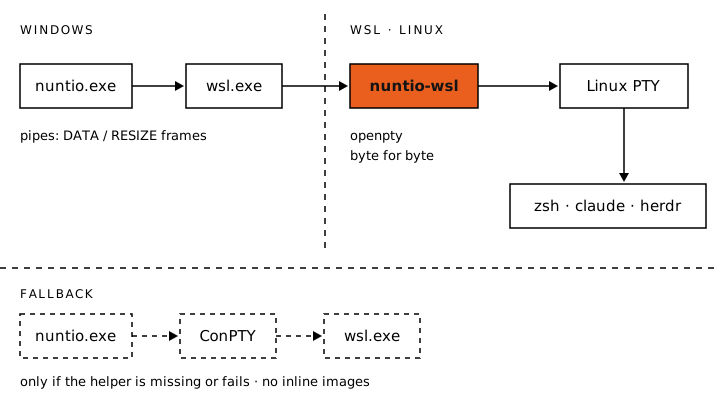
nuntio starts wsl.exe with plain pipes. wsl.exe runs nuntio-wsl in the distribution, and the helper opens a Linux PTY with openpty and starts the shell as its session leader. The helper is installed next to nuntio.exe; nothing needs to be installed in the distribution.
The pipes carry a small protocol:
- nuntio to helper (stdin) is a sequence of frames,
[kind u8][len u32 LE][payload]. ADATAframe (kind 0) carries input for the shell. ARESIZEframe (kind 1) carries the window size: columns, lines, cell width and cell height, each as a 16-bit little-endian number. A payload is at most 1 MiB, and the first frame must be aRESIZE. - Helper to nuntio (stdout) is the raw output of the PTY. The helper writes a
READYmarker, the unknown escape sequenceESC ] nuntio-wsl;ready BEL, once the shell runs, and nuntio strips it. Reports about the foreground program are mixed in the same way. - stderr carries the helper's own messages.
nuntio avoids ConPTY for these panes because it doesn't pass the stream through unchanged: it forwards inline image sequences ahead of the cursor moves that came before them, so images end up in the wrong place. With the helper, the stream reaches nuntio's parser exactly as the program wrote it.
nuntio adds TERM, COLORTERM, TERM_PROGRAM, TERM_PROGRAM_VERSION and PI_FORCE_IMAGE_PROTOCOL to WSLENV, so they reach programs in the distribution, and keeps the entries you already have. See Protocols.
What you get
- Inline images and Kitty keys. Programs in WSL can use the Kitty graphics protocol, iTerm2 inline images and the Kitty keyboard protocol as they do on Linux, because the output reaches nuntio untouched. nuntio sets
PI_FORCE_IMAGE_PROTOCOL=kittyin these panes, so omp shows images inline. See Protocols. - Tab titles from the foreground program. The helper reports which program runs in the foreground and whether it is the shell itself. With
tabs.title = "auto", a tab shows the directory while the shell waits at its prompt and the program's title or name while it runs, as on Linux. - The working directory. nuntio on Windows can't see processes inside WSL, so the shell has to report its directory. nuntio reads OSC 7 (which fish sends on its own), OSC 9;9 (the Windows Terminal convention) or, failing both, a window title that shows the directory like the default prompt of Ubuntu and Debian (
user@host: ~/code). Splits start in the directory of the focused pane. New tabs do the same withtabs.inherit_directory, and the path is translated between Windows and WSL (C:\xand/mnt/c/x). From one distribution to another, nothing is inherited. Working directory in WSL shows how to send OSC 7 from bash and zsh. - herdr and tmux inside the distribution. With
herdr.enabledortmux.enabled, nuntio looks forherdrandtmuxin every distribution and lists their sessions in the shell menu asherdr · <distribution>andtmux · <distribution>. In a pane that runs either one, the split, focus, resize and zoom shortcuts send the multiplexer's own keys. Theprogramsetting does not apply inside WSL: nuntio uses theherdrortmuxit finds there. - herdr agent status. For a herdr server in a distribution, nuntio runs
nuntio-wsl socket <path>, which copies between its standard streams and herdr's Unix socket, so the status bar, tab dots and banners work with agents in WSL.
Fallback
If wsl.exe exits before the helper reports READY, nuntio starts the same shell through ConPTY and shows a banner: "nuntio-wsl did not start; this pane runs through ConPTY, without inline images". The pane works, but images show up in the wrong place or not at all, and PI_FORCE_IMAGE_PROTOCOL is empty so omp shows text instead.
If the helper isn't there to start, WSL panes use ConPTY from the start, without a banner. That happens when nuntio-wsl is missing next to nuntio.exe, and when an x86_64 nuntio runs on Windows on Arm, because the helper is built for the same architecture as nuntio.exe and the WSL there is aarch64.
Limits
- The
nuntio-configcommand isn't available in shells thatshell.wslstarts in a WSL distribution. Edit the config file instead. - nuntio can't see the processes inside WSL, so with
confirm_closeit closes a window, tab or pane without asking, even if a program runs.
nuntio inside WSLg
The Linux build of nuntio also runs inside WSL, under WSLg. When it runs on Wayland there, it creates its window undecorated, because WSLg's compositor (Weston) crashes on pointer motion over windows with client-side decorations. nuntio then draws its own header, as with decorations = "custom": the tab bar is always shown, moves the window and carries the minimize, maximize and close buttons, and the window edges resize it. nuntio-config works in this setup, and the relay described above is not involved, because the shell runs in the same Linux system as nuntio.